
Get closer to what's working.
Go from campaign performance to the creative, placement and customer behaviour behind it. Keep Meta's reporting alongside the orders your store can attribute.
Meta analytics is included on Starter and higher with a connected Meta Ads account.
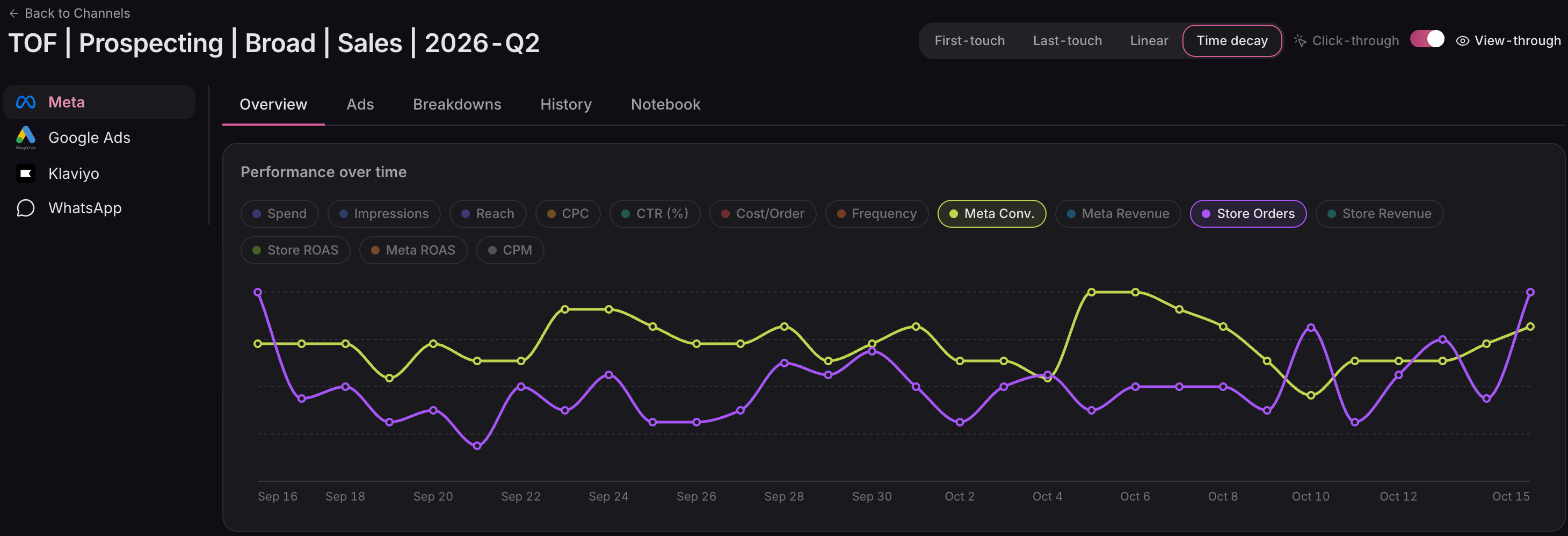
Compare Meta-reported conversions with store orders over time. The gap gives you a question to investigate.
Full viewSwipe or scroll to explore. Use arrow keys when focused.
01 / Find the signal
Start wide.
Then get specific.
Compare campaigns over the same dates, find the movement worth investigating, then open a campaign to see its ad sets, ads and performance over time.
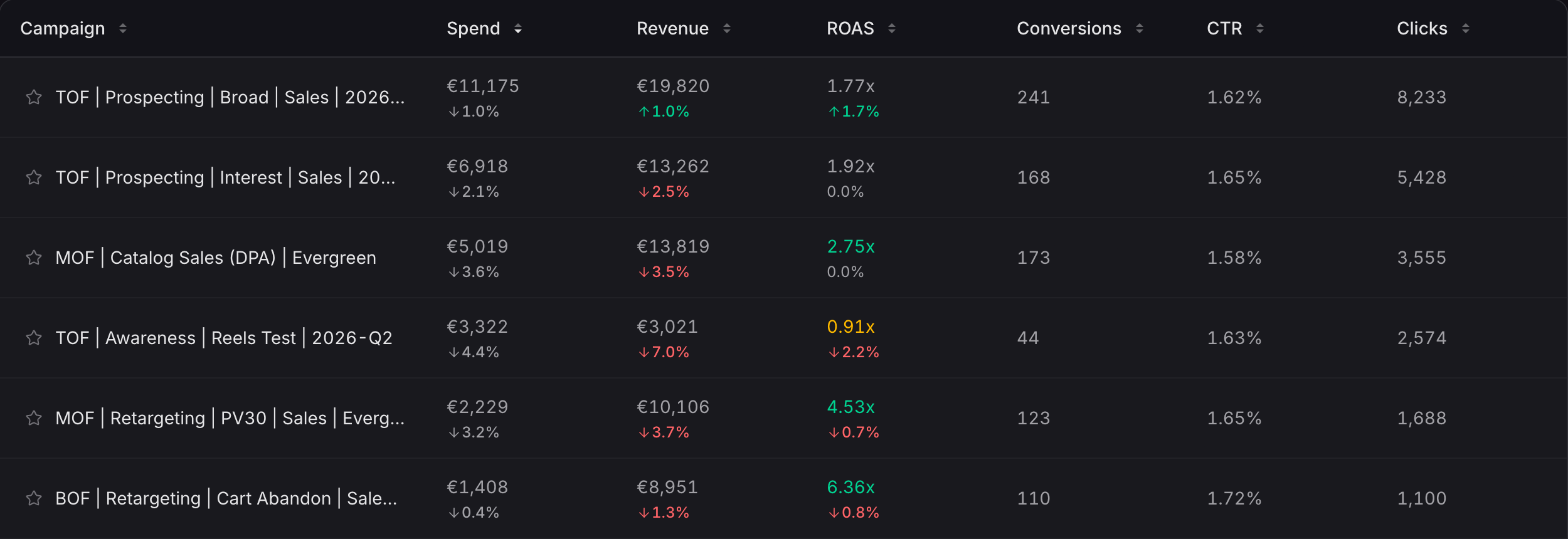
Spend and return share a row, with period comparisons to help you spot what's changed.
Full viewSwipe or scroll to explore. Use arrow keys when focused.
A higher platform-reported conversion count is a difference in measurement to understand, not automatic proof that the campaign worked.
02 / Look inside the ad
The average hides
the useful detail.
A single campaign can contain very different results. Break it down to understand the message people saw, where it ran, and the audiences it reached.
- Creative
The message and its results
See the thumbnail, headline and copy alongside each ad's performance. Expand an ad to read the full text and follow its trend.
- Placement
Where the budget went
Compare spend, Meta-reported conversions and ROAS across Feed, Stories, Reels and other placements.
- Audience
Who the ad reached
Open an ad set for aggregate age and gender breakdowns. Campaign breakdowns add device and conversion-action detail.
03 / Follow the customer
The first order
starts the story.
A campaign's Overview also follows the customers it acquired: their first-order revenue, repeat spend, acquisition cost and estimated payback. Put today's performance in the context of what happens next.
Explore customer analyticsStore-attributed revenue is net of sales returns. Click-through and view-through views use different evidence; view-through includes conversions reported by Meta.
Which plan includes Meta analytics?
Meta campaign reporting, creative library and breakdowns are available on Starter and higher. Creative studio for generating new ad variants is on Advanced and higher.
How much history comes in?
The first sync brings in the recent 90 days of insights and creative metadata. Deeper available history fills in afterward. Settings → Sync Status shows the progress.
Why don't store and Meta conversions match?
Meta can report viewed ads and cross-device conversions that a storefront click trail cannot observe. Attribution windows also differ. Keep both views in context; neither alone establishes incremental lift.
Are all breakdowns available immediately?
They depend on the data Meta returns for your account and date range. Placement detail can arrive later than headline performance, and some breakdowns may be empty.
Know where to look before you spend more.
Connect Meta and bring campaign performance, creative and store outcomes into one workspace.
Connect your store