
They left. See what happened first.
Watch the journey behind a visit. Find the clicks that went nowhere, investigate recurring friction, and give your next improvement a concrete starting point.
Available on Advanced. Requires Ordinary’s app embed in your theme.
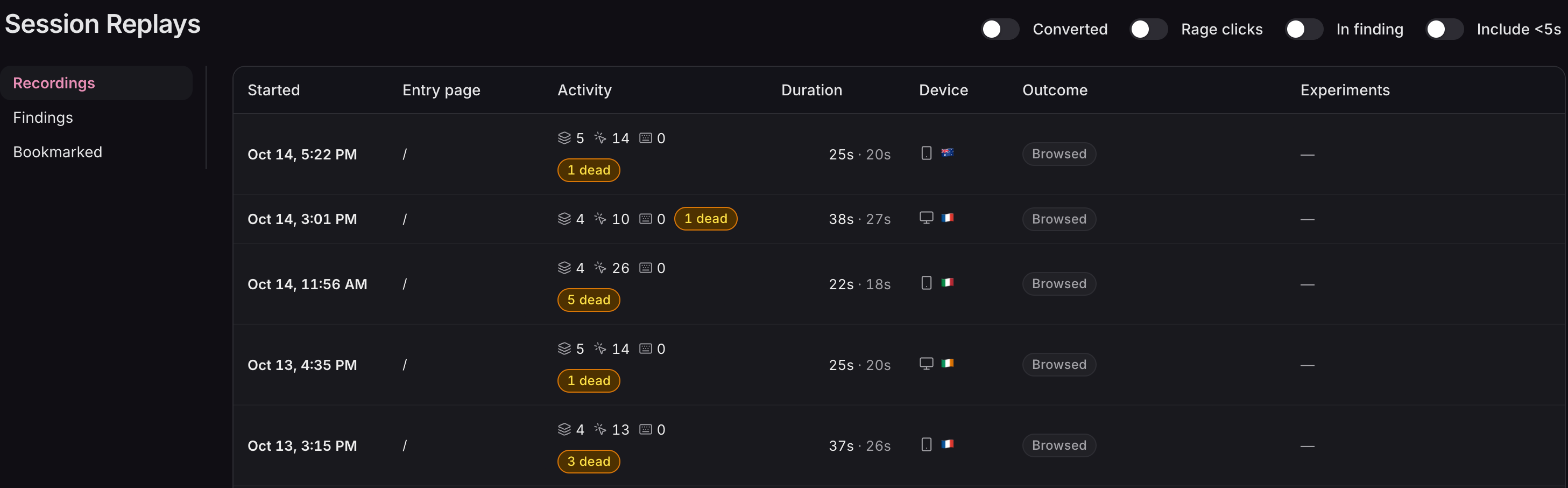
Entry page, activity, device, and outcome give every recording context before you press play.
Full viewSwipe or scroll to explore. Use arrow keys when focused.
01 / Find the signal
Start with a clue.
Follow the evidence.
You don’t need to work through every recording in order. Filter by outcome, look for repeated frustration, or open the sessions behind an AI finding. Each is a different way into the same question: what deserves a closer look?
- 01
The interaction
Rage clicks flag repeated taps on one element. Dead clicks flag interactions with no visible response. Open the recording to see the surrounding context.
- 02
The pattern
Findings bring recurring behaviour together, with session counts and links to example recordings. Use the analysis as a lead you can check for yourself.
- 03
The outcome
Filter for converted sessions to see what a buying journey looked like. Compare the route to purchase with the visits that stopped short.
Findings refresh on a schedule after enough sessions have accumulated. An empty list on a new store means there may not be enough evidence yet.
02 / Watch the journey
The visit unfolds.
The context stays.
See the pages, cursor, scrolling, and clicks alongside an interaction timeline. Jump to a moment, change playback speed, or skip inactivity to get to the part you came to understand.
- 01 / Storefront video
Watch the shopping
Follow the recorded visit through product pages, navigation, and cart activity. The timeline lets you jump directly to an interaction.
- 02 / Checkout timeline
Follow the handoff
Shopify checkout is not visually recorded. The timeline continues with the checkout steps reached and whether the shopper completed the purchase.
- 03 / Connected order
See the result
A converted recording links to the order it produced. From an order, you can also open its associated session recording.
A replay shows what happened on your store. It can’t tell you everything the shopper was thinking.
03 / Test the fix
Keep the evidence.
Question the solution.
Bookmark a useful visit and add a note for your team. The recording and the context stay together, so the next person can see the same problem.
Then turn the observation into a test. Session recordings help you choose what to try; an A/B test tells you whether it made the store better.
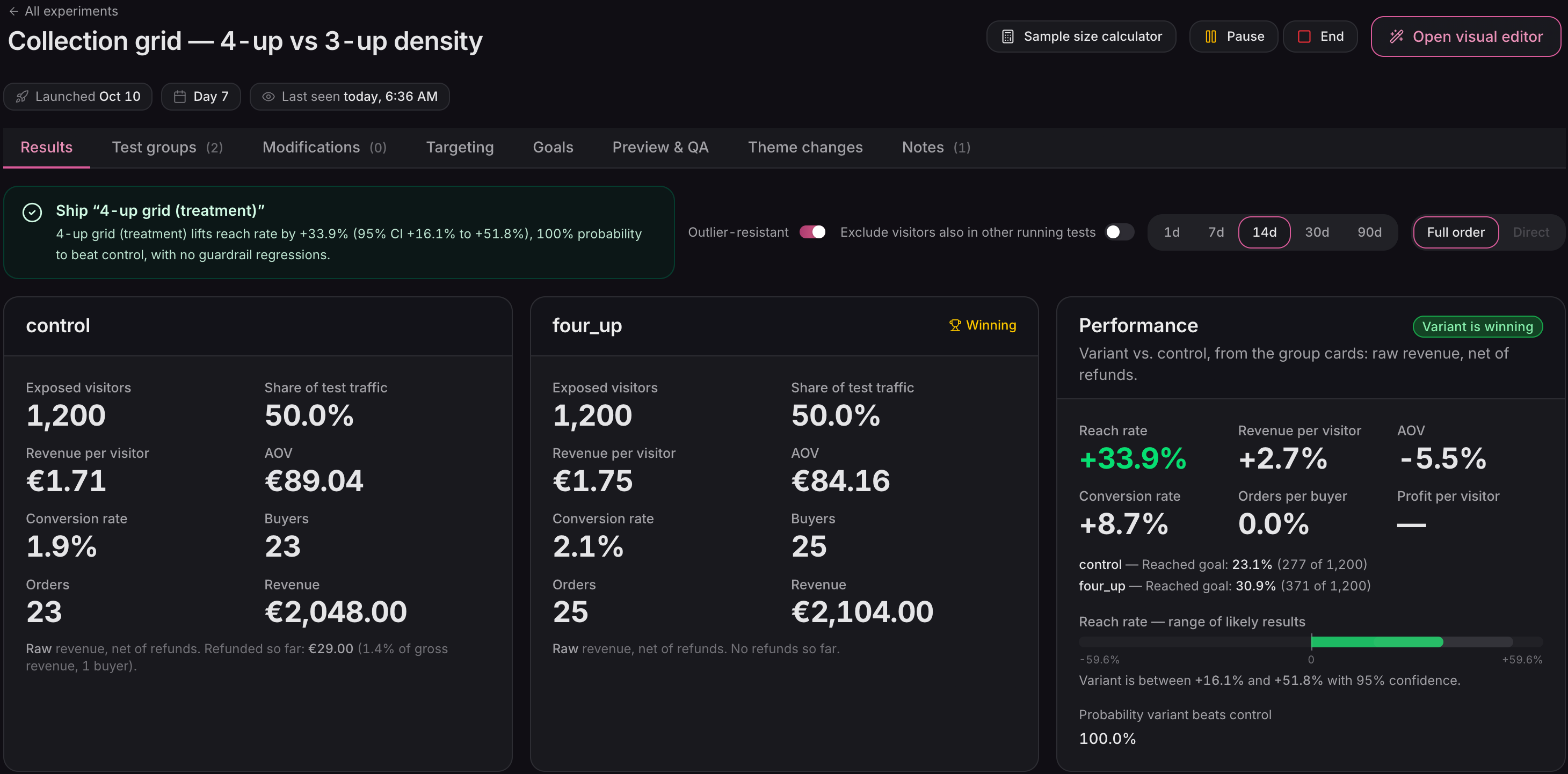
A separate A/B experiment compares the proposed change against your current page. Recordings inform the idea; the experiment evaluates it.
Full viewSwipe or scroll to explore. Use arrow keys when focused.
When Always record experiment sessions is enabled, eligible experiment visits skip sampling. Consent requirements and recording exclusions still apply.
04 / The details
Useful context.
Clear boundaries.
Recording is a layer of evidence alongside your reporting. Know what is captured, what is sampled, and what needs a human read.
Read the session recordings guideWhich plan includes session recordings?
Session Replays is included on Advanced. Recording starts automatically on an eligible plan with Ordinary’s app embed enabled in your theme. Settings → Session Replays controls recording, the daily target, and minimum session length.
Is every visitor recorded?
Not necessarily. The target is 200 recordings per day by default, and busy stores are sampled toward that target. Very short visits, known bots, and visits without consent where it is required are excluded. Sampling recordings does not change your revenue or conversion reporting.
What do the AI findings tell me?
Findings describe recurring patterns across recorded sessions and link to examples. They refresh on a schedule once enough data is available. Treat them as evidence to investigate, not proof of a shopper’s intent or a guarantee that a proposed change will increase sales.
What about checkout and personal information?
Values typed into form fields are masked in the shopper’s browser before transmission. Shopify checkout pages are not visually recorded; checkout progress appears in the event timeline. Recording requires affirmative consent in the EU/EEA, UK, Switzerland, and Brazil.
See the Privacy Policy and sub-processor list for the full details.
How long can I keep a recording?
Replay video is kept for 30 days. Bookmarking a session keeps its recording until you remove the bookmark, and notes are shared with your team. Session statistics are kept for 90 days.
Find a better starting point for your next improvement.
Connect your Shopify store and explore session recordings on Advanced. Start with a real visit, then test what you learn.
Connect your store