
Make the sale. Understand the margin.
Put product costs, fulfilment, shipping and payment fees beside your revenue. See what an order leaves you, then explore the economics of your next offer before you run it.
Cost setup on every plan. Product Financials and Offer Calculator on Advanced and above.
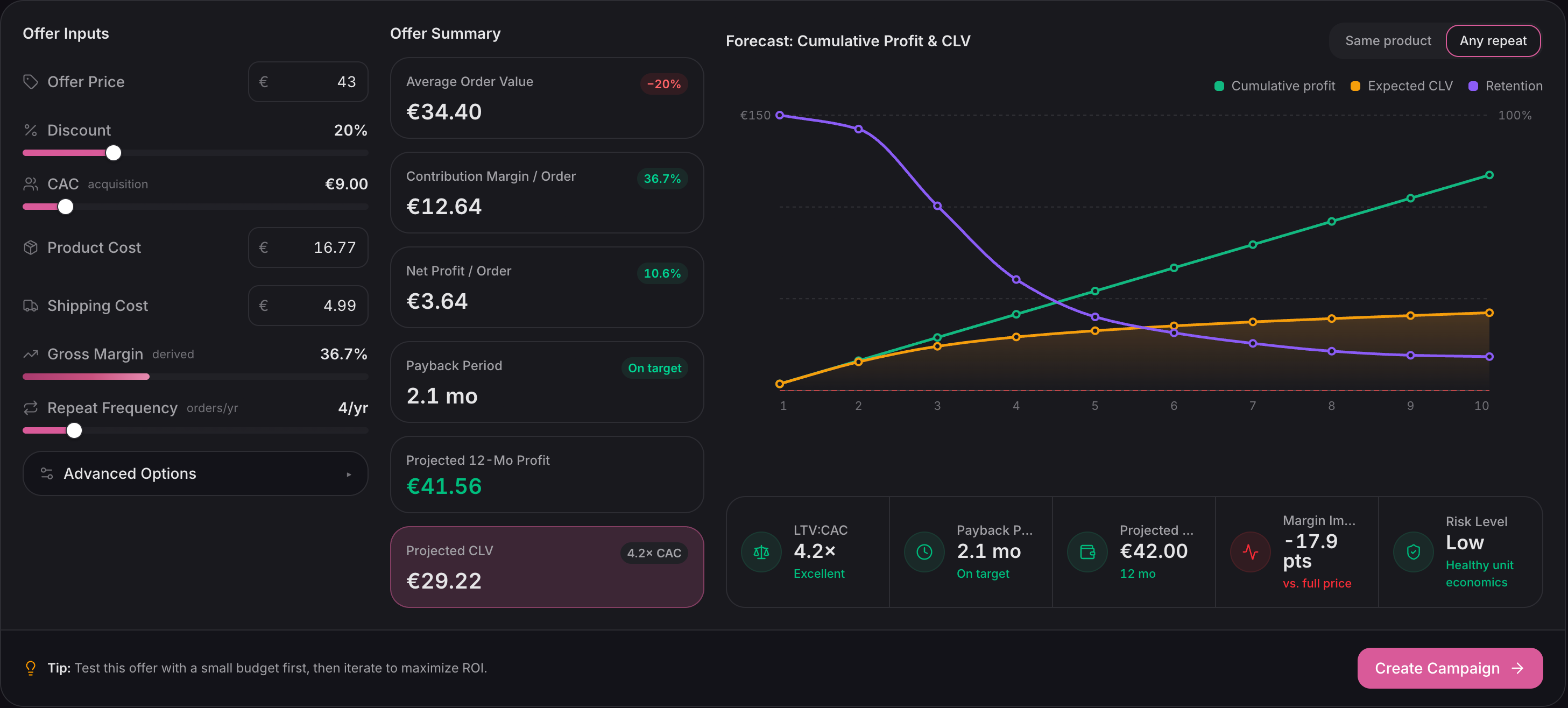
Adjust the offer, costs and repeat-purchase assumptions to compare possible outcomes. This is a modelled scenario, not a realised result.
Full viewSwipe or scroll to explore. Use arrow keys when focused.
01 / Your cost foundation
Start with what
you already know.
If your product variants have a Cost per item in Shopify, Ordinary picks it up and refreshes it daily. Add your typical fulfilment, shipping and payment fees to bring more of the order into view.
Your own corrections take precedence. A daily Shopify sync never writes over the costs you've entered in Ordinary.
- 01 / Connect
Bring over Shopify costs
Use the product cost data already in your catalogue. No second round of typing.
- 02 / Complete
Fill the gaps in a spreadsheet
Download your existing costs, edit the exceptions and review the changes before saving.
- 03 / Fine-tune
Edit a cost where you see it
On Advanced, correct individual product costs directly in Product Financials, including products with several variants.
A missing cost is never a free product.
Coverage measures the share of recent revenue with cost data, rather than the share of your catalogue. Start with the products that actually sell.
Below 70% coverage, profit figures are held back. Where paid items still lack costs, the “≤” marker tells you the true profit can only be lower.
02 / The margin behind a sale
Give revenue
the rest of the story.
A healthy sales total can hide a thin margin. Ordinary works from revenue after discounts and refunds, removes tax, then deducts product costs and the per-order costs you've provided.
Product Financials puts profit and margin beside individual products, so a bestseller doesn't disappear inside a blended average.
Without per-order costs, the figure is labelled Gross profit. Add them and it becomes Profit, with any remaining omissions named. Advertising spend and business overhead are separate from this order-profit calculation.
- Revenue before taxAfter discounts and refunds
- £80.00
- Product costWhat the items cost when sold
- −£28.00
- FulfilmentYour per-order pick and pack cost
- −£4.00
- ShippingYour per-order carrier cost
- −£6.00
- Payment feesPercentage and fixed transaction fee
- −£2.70
- ProfitAfter the costs shown above
- £39.30
49.1% margin£39.30 ÷ £80.00 revenue before tax
03 / The next offer
Work through the offer
before you run it.
A discount changes more than your conversion rate. Use the Offer Calculator to explore the first order, the cost of acquiring that customer and the repeat purchases needed to make the scenario work.
Product and shipping costs seed the inputs. Repeat frequency starts from your store's retention behaviour. Every assumption is yours to adjust.
- 01 / First order
Can the margin support it?
Change discount depth, product cost, shipping and CAC. Read contribution margin and net profit per order together.
- 02 / Repeat purchases
What needs to happen next?
Compare “Same product” with “Any repeat” to see how different buying patterns change projected value and payback.
- 03 / Compare
Keep the scenarios worth testing.
Save your inputs for the team, then reopen them to compare offers or revisit assumptions after a promotion.
The forecast is a way to question an offer.
It doesn't predict how many people will buy, whether they would have bought at full price, or how frequent discounting changes your brand. Use it to make the assumptions visible, then test the idea.
Explore the retention behind the model04 / Good to know
Know what
the number includes.
Cost source, timing and coverage matter as much as the headline margin.
Compare plansWhat happens when my supplier cost changes?
New orders record item costs when they arrive, so later cost changes don't rewrite those snapshots. Older orders without a cost snapshot use current costs and are approximate. Today's product cost is also what the Offer Calculator uses to plan a future promotion.
How are tax and refunds handled?
Profit uses revenue before tax and after discounts and refunds. A returned item's cost comes off with its revenue. If prices include tax, set your rate in Product Costs; Ordinary does not guess it. Revenue totals themselves continue to include tax.
Can I use different costs for different products?
Yes. Set product or variant costs, and override fulfilment and shipping figures for individual products where needed. The product cost columns show those overrides; order-profit calculations use your store-wide per-order fulfilment and shipping figures.
Which tools are included in my plan?
Product Costs settings, Shopify cost sync and spreadsheet uploads are available on every plan. Product Financials, inline cost editing and the Offer Calculator are available on Advanced and above.
Give every growth decision a cost foundation.
Connect Shopify, bring in the costs you already know, and see the economics behind your products and promotions.
Connect your store